

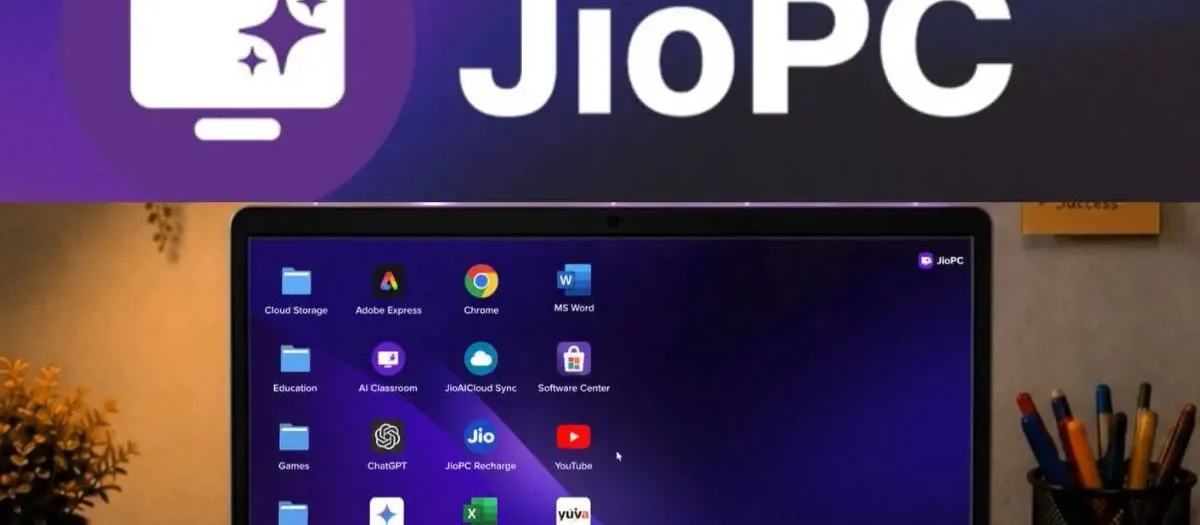
Reliance Jio has expanded JioPC in India as a standalone cloud computing service that can give older laptops and desktops access to additional computing resources without requiring a hardware upgrade. The service can now be used with an internet connection from any telecom or broadband provider, instead of being limited to JioHome users.
JioPC works by running a virtual desktop in the cloud and streaming that computing environment to an existing computer through a web browser. Jio says users can access configurations with up to 16GB RAM and 1TB of cloud storage, making the service an option for people whose older computers have become slow or have limited storage.
What Is JioPC?
JioPC is a computer-as-a-subscription service. Instead of installing a new processor, adding physical RAM or replacing a laptop, the computing workload is handled through Jio’s cloud infrastructure.
Jio says the service is designed to extend the usable life of existing computers and provide access to modern applications and AI tools without buying expensive new hardware.
JioPC Price and Plans in India
According to current reporting on the standalone launch, JioPC subscriptions start at ₹1,000. The standard configuration offers 8GB RAM and 500GB storage, while the JioPC Ultra configuration provides 16GB RAM and 1TB storage.
| Plan | RAM | Cloud Storage | Price |
|---|---|---|---|
| JioPC | 8GB | 500GB | ₹1,000 for 2 months |
| JioPC | 8GB | 500GB | ₹2,000 for 5 months |
| JioPC | 8GB | 500GB | ₹4,000 for 10+2 months |
| JioPC Ultra | 16GB | 1TB | ₹1,200 for 2 months |
| JioPC Ultra | 16GB | 1TB | ₹2,500 for 5 months |
| JioPC Ultra | 16GB | 1TB | ₹5,000 for 10+2 months |
These reported standalone-plan prices differ from some JioPC offers displayed on Jio’s website, so users should check the current price and applicable offer before subscribing. Jio’s official page currently lists separate subscription offers and configurations.
How JioPC Turns an Old Computer Into a Cloud PC
JioPC does not physically upgrade the processor or RAM inside your laptop or desktop. Instead, it provides a virtual computer hosted in the cloud and lets the existing device act as the interface for accessing it.
To use JioPC through a browser, users need an existing laptop or desktop with a supported web browser, an internet connection and an active JioPC subscription. Jio says a JioFiber or JioAirFiber connection is not required for browser-based access.
- Open the JioPC website on your existing computer.
- Sign in using the mobile number used during registration.
- Set a password and verify the account using the OTP.
- Wait for the virtual desktop to be prepared.
- Launch the JioPC virtual desktop from the browser.
Jio says the setup can be completed in less than five minutes and does not require new hardware installation or data migration.
JioPC Works With Any Internet Connection
One of the biggest changes in the latest JioPC rollout is that users no longer need a JioHome broadband connection to access the service through a browser. Jio’s official FAQ says browser-based JioPC works with any broadband or internet connection.
That means users on other telecom and broadband providers can also access the cloud PC, provided they have a suitable internet connection. Reports also indicate that JioPC can work over reliable 4G and 5G connections, although the experience will depend on network quality and latency.
JioPC Specifications
Jio currently lists two virtual machine configurations for JioPC. The higher configuration provides 8 virtual CPUs, 16GB RAM and 1TB storage, while the other provides 4 CPUs, 8GB RAM and 500GB storage. Both configurations use Ubuntu Linux.
- Standard: 4 CPU, 8GB RAM, 500GB storage
- Ultra: 8 CPU, 16GB RAM, 1TB storage
- Operating system: Ubuntu/Linux
- Access: Existing computer through a supported browser
- Internet: Any broadband or internet connection for browser access
What Software Is Included?
JioPC provides an Ubuntu/Linux-based virtual desktop. Jio says the environment comes with software such as LibreOffice, web browsers for online applications including Microsoft 365, and design tools such as Adobe Express.
Jio also positions the service as an AI-ready computing option, allowing users to access AI tools without relying entirely on the physical hardware inside an older computer.
Can an Eight-Year-Old Computer Use JioPC?
Jio says its cloud service can help computers as old as eight years access the computing and storage capabilities required by modern applications, including AI-powered software. This is a claim about the cloud service rather than a guarantee that every eight-year-old computer will deliver the same experience.
The physical computer still needs to handle basic tasks such as displaying the streamed desktop, receiving keyboard and mouse input and maintaining an internet connection. Therefore, network quality and the condition of the existing device remain important.
JioPC on a TV
JioPC can also be used on a TV through a Jio Set Top Box. In this setup, users need a compatible screen, an active Jio Set Top Box connection, a keyboard and mouse, and an active JioPC subscription.
Jio’s original JioPC offering was introduced in 2025 as a cloud-based virtual desktop for JioFiber and Jio AirFiber users through the company’s set-top box. The latest standalone rollout expands access to existing laptops and desktops through a browser.
JioPC vs Buying a New Computer
| JioPC | New Computer |
|---|---|
| Uses existing laptop or desktop | Requires new hardware |
| Computing resources hosted in the cloud | Computing resources are inside the device |
| Subscription-based | Higher upfront purchase cost |
| Cloud-managed updates and maintenance | User manages hardware and software |
| Requires a reliable internet connection | Many basic tasks can work offline |
Who Should Consider JioPC?
JioPC could be useful for students, families and professionals who already own a working laptop or desktop but find it increasingly slow or limited by storage. It may also appeal to users who need a computer-like environment without spending a large amount on new hardware.
However, users who regularly work offline, need high-end local graphics performance or depend on software that requires Windows-specific hardware or drivers should check compatibility before subscribing. JioPC’s virtual desktop environment is based on Ubuntu/Linux.
Is JioPC Really an Upgrade?
JioPC is better understood as a cloud computing upgrade rather than a physical hardware upgrade. It does not increase the actual RAM, processor speed or storage capacity of the laptop itself. Instead, it gives the user access to a more capable virtual computer through the internet.
This approach can be useful when the existing device is still functional but no longer powerful enough for the software the user wants to run. The trade-off is that the experience depends heavily on internet connectivity and the availability of the cloud service.
JioPC Data and Security
Jio says JioPC data is stored in enterprise-grade cloud storage with disaster recovery and uses a Zero Trust security model. The company also states that data is not stored on the user’s device, so losing or damaging the access device does not remove the cloud-stored data.
Users should still follow standard account-security practices, including using a strong password and protecting the mobile number used for account verification.
Frequently Asked Questions
What is JioPC?
JioPC is a subscription-based virtual desktop service that provides cloud computing resources through an existing computer or, with a Jio Set Top Box, a TV or compatible screen.
Can I use JioPC without JioFiber?
Yes. For browser-based access, Jio says JioPC works with any broadband or internet connection and does not require JioFiber or JioAirFiber.
How much RAM does JioPC provide?
Jio lists configurations with up to 16GB of RAM. The higher configuration also includes 8 CPUs and 1TB of cloud storage.
Can JioPC make an old laptop faster?
JioPC can move computing workloads to the cloud, which can make a compatible older computer more useful for cloud-based tasks. It does not physically upgrade the laptop’s processor or RAM.
Does JioPC require new hardware?
No. Browser-based JioPC is designed to work with an existing laptop or desktop and a supported web browser.
Latest Status
JioPC is now available in India as a standalone cloud computing service, expanding beyond its earlier JioHome-focused model. The service provides up to 16GB RAM and 1TB cloud storage on supported plans, while allowing users to access the virtual desktop from an existing computer without purchasing new hardware.




Leave a Reply